In this final chapter, we’ll build an automated HubSpot agent together. Our HubSpot agent uses:
  1. Triggers to run the agent whenever a new HubSpot record is created
  2. Tools for the agent to get, create, and update HubSpot data if it’s relevant to the user’s prompt template.
1. Authenticate our User and Connect their HubSpot Integration

First we’ll generate a Paragon-signed JWT for our user that we’ll use client-side with the Paragon SDK.
server-side function
import jwt from "jsonwebtoken";

const PROJECT_ID = process.env.NEXT_PUBLIC_PARAGON_PROJECT_ID!;
const SIGNING_KEY = process.env.PARAGON_SIGNING_KEY!;

export function signParagonToken(userId: string): string {
  const currentTime = Math.floor(Date.now() / 1000);

  return jwt.sign(
    {
      sub: userId,
      aud: `useparagon.com/${PROJECT_ID}`,
      iat: currentTime,
      exp: currentTime + 60 * 60,
    },
    SIGNING_KEY,
    { algorithm: "RS256" }
  );
}
Then we can use the Paragon SDK to authenticate and connect our user’s HubSpot account.
calling our backend route to retrieve our JWT before authenticating
const res = await fetch("/api/auth/paragon-token", {
  method: "POST",
  headers: { "Content-Type": "application/json" },
  body: JSON.stringify({ userId }),
});
const { token } = await res.json();

await paragon.authenticate(PROJECT_ID, token);
Paragon.connect to bring up the Connect Portal
<button onClick={async() => await paragon.connect("hubspot", {})}
  className="w-full rounded-lg bg-orange-500 px-4 py-3 text-sm font-semibold text-white hover:bg-orange-600 transition-colors"
>
  Connect HubSpot
</button>

2. Let our Users Configure their HubSpot Event Subscription

Using the GET triggers endpoint, we can let our users select the type of HubSpot event they’d like their agent to receive.
Gets the available Triggers for our specific user
const PROJECT_ID = process.env.NEXT_PUBLIC_PARAGON_PROJECT_ID!;
const BASE_URL = "https://actionkit.useparagon.com";

async function fetchActionKit(
  path: string,
  userId: string,
  options: RequestInit = {}
) {
  const token = signParagonToken(userId);
  const res = await fetch(`${BASE_URL}${path}`, {
    ...options,
    headers: {
      Authorization: `Bearer ${token}`,
      "Content-Type": "application/json",
      ...options.headers,
    },
  });

  if (!res.ok) {
    const body = await res.text();
    throw new Error(`ActionKit API error ${res.status}: ${body}`);
  }

  return res.json();
}

export async function listAvailableTriggers(
  userId: string,
  integration = "hubspot"
): Promise<Record<string, TriggerDefinition[]>> {
  const data = await fetchActionKit(
    `/projects/${PROJECT_ID}/triggers?integrations=${integration}`,
    userId
  );
  return data.triggers;
}
Use the Triggers response to surface configurations to our user
{selectedTrigger.parameters.map((p) => (
  <div key={p.id}>
    <label className="block text-xs font-medium text-zinc-700 dark:text-zinc-400 mb-2 uppercase tracking-wide">
      {p.title} {p.required && <span className="text-red-500">*</span>}
    </label>
    <input type="text"
      value={triggerParams[p.id] ?? ""}
      onChange={(e) =>
        setTriggerParams((prev) => ({
          ...prev,
          [p.id]: e.target.value,
      }))}
      placeholder={p.values ? p.values[0] : p.type}
      className="w-full rounded-md border border-zinc-300 dark:border-zinc-600 bg-white dark:bg-zinc-800 px-3 py-2 text-sm focus:outline-none focus:ring-2 focus:ring-orange-500" />
  </div>
))}
After the user selects a Trigger and configures it, we can subscribe to that user’s HubSpot events.
Subscribes to the Trigger
// fetchActionKit appends the endpoint on ActionKit's base URL
export async function subscribeToTrigger(
  userId: string,
  integration: string,
  triggerType: string,
  parameters: Record<string, unknown>,
): Promise<TriggerSubscription> {
  const body: Record<string, unknown> = {
    integration,
    type: triggerType,
    parameters,
    webhookOverride: {
      url: process.env.WEBHOOK_ENDPOINT,
    }
  }
  return fetchActionKit(
    `/projects/${PROJECT_ID}/trigger-subscriptions`,
    userId,
    {
      method: "POST",
      body: JSON.stringify(body),
    }
  );
}

3. Kick Off an Agent with Tools Whenever a New Event Fires

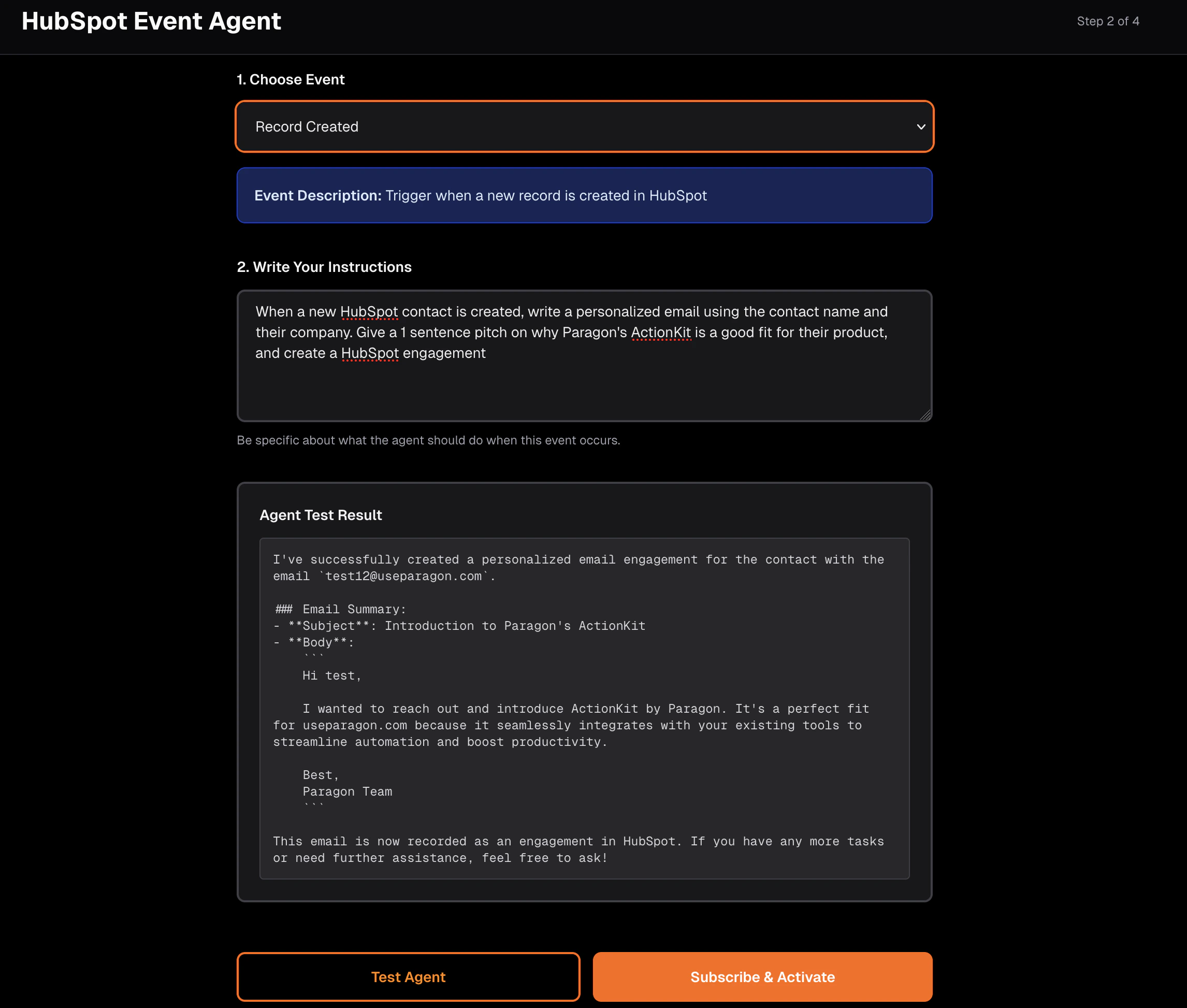
Whenever a new HubSpot event occurs (new record, updated record, deleted record), Triggers will send a webhook to our process.env.WEBHOOK_ENDPOINT. That endpoint will kick off an agent with HubSpot Tools for followup work. In the screenshot above, the custom prompt was:
When a new HubSpot contact is created, write a personalized email using the 
contact name and their company. Give a 1 sentence pitch on why Paragon's
ActionKit is a good fit for their product, and create a HubSpot engagement.
Our automated agent should use the HUBSPOT_CREATE_ENGAGEMENT Tool to perform its task. First let’s get pre-built tools for our agent using ActionKit’s Tools API.
Get ActionKit Tools
// fetchActionKit appends the endpoint on ActionKit's base URL
export async function listTools(
  userId: string,
  integration = "hubspot"
): Promise<Record<string, ToolDefinition[]>> {
  const data = await fetchActionKit(
    `/projects/${PROJECT_ID}/tools?integrations=${integration}&format=json_schema`,
    userId
  );
  return data.tools;
}
Next, we’ll format these Tools per Vercel’s ai-sdk specifications for their agent (you can format Tools for Vercel, LangChain, or any LLM API directly).
import { tool, type ToolSet } from "ai";
import { z } from "zod";

async function getHubSpotTools(userId: string): Promise<ToolSet> {
  const toolsMap = await listTools(userId, "hubspot");
  const hubspotTools = toolsMap.hubspot ?? [];

  const tools: ToolSet = {};

  for (const t of hubspotTools) {
    const fn = t.function;
    const toolName = fn.name;

    const paramSchema: Record<string, z.ZodTypeAny> = {};
    if (fn.parameters && typeof fn.parameters === "object") {
      const props = (fn.parameters as { properties?: Record<string, { type?: string; description?: string }> }).properties ?? {};
      const required = (fn.parameters as { required?: string[] }).required ?? [];

      for (const [key, val] of Object.entries(props)) {
        let schema: z.ZodTypeAny = z.string();
        if (val.type === "number" || val.type === "integer") {
          schema = z.number();
        } else if (val.type === "boolean") {
          schema = z.boolean();
        } else if (val.type === "array") {
          schema = z.array(z.string());
        }
        if (!required.includes(key)) {
          schema = schema.optional();
        }
        if (val.description) {
          schema = schema.describe(val.description);
        }
        paramSchema[key] = schema;
      }
    }

    tools[toolName] = tool({
      description: fn.description ?? `HubSpot action: ${toolName}`,
      inputSchema: z.object(paramSchema),
      execute: async (params: Record<string, unknown>) => {
        console.log(`[Agent] Running tool: ${toolName}`, params);
        const result = await runTool(userId, toolName, params);
        return result;
      },
    });
  }

  return tools;
}
Now we can provide our ai-sdk agent with the formatted Tools.
import { generateText, gateway, stepCountIs } from "ai";

export async function runAgent(
  userId: string,
  eventPayload: Record<string, unknown>,
  triggerType: string,
  userPrompt: string
): Promise<string> {
  const hubSpotTools = await getHubSpotTools(userId);
  const toolNames = Object.keys(hubSpotTools);

  const systemPrompt = `You are an AI agent that responds to HubSpot events. You have access to the following HubSpot tools: ${toolNames.join(", ")}.

When a HubSpot event occurs, use the event data along with the user's instructions to decide what actions to take. Call the appropriate tools to fulfill the user's request.

Always explain what you're doing and why. If you cannot fulfill the request with available tools, explain what's missing.

Current event type: ${triggerType}`;

  const eventDescription = `A HubSpot event just fired:
Event Type: ${triggerType}
Event Data: ${JSON.stringify(eventPayload, null, 2)}

User's instruction for this event: ${userPrompt}`;

  const { text } = await generateText({
    model: gateway("openai/gpt-5"),
    system: systemPrompt,
    prompt: eventDescription,
    tools: hubSpotTools,
    stopWhen: stepCountIs(10),
  });

  return text;
}
We now have a fully reactive agent that fires around the clock, using:
  1. Triggers to “prompt” the agent to work whenever our users have their configured event fire
  2. Tools to give our agent integration tools that can write back to the triggered integration or any other Paragon integration