> ## Documentation Index
> Fetch the complete documentation index at: https://docs.useparagon.com/llms.txt
> Use this file to discover all available pages before exploring further.
# Task Usage
> Learn how tasks are counted in Paragon.
A task is a unit of work that occurs in the Paragon platform on behalf of your Connected User.
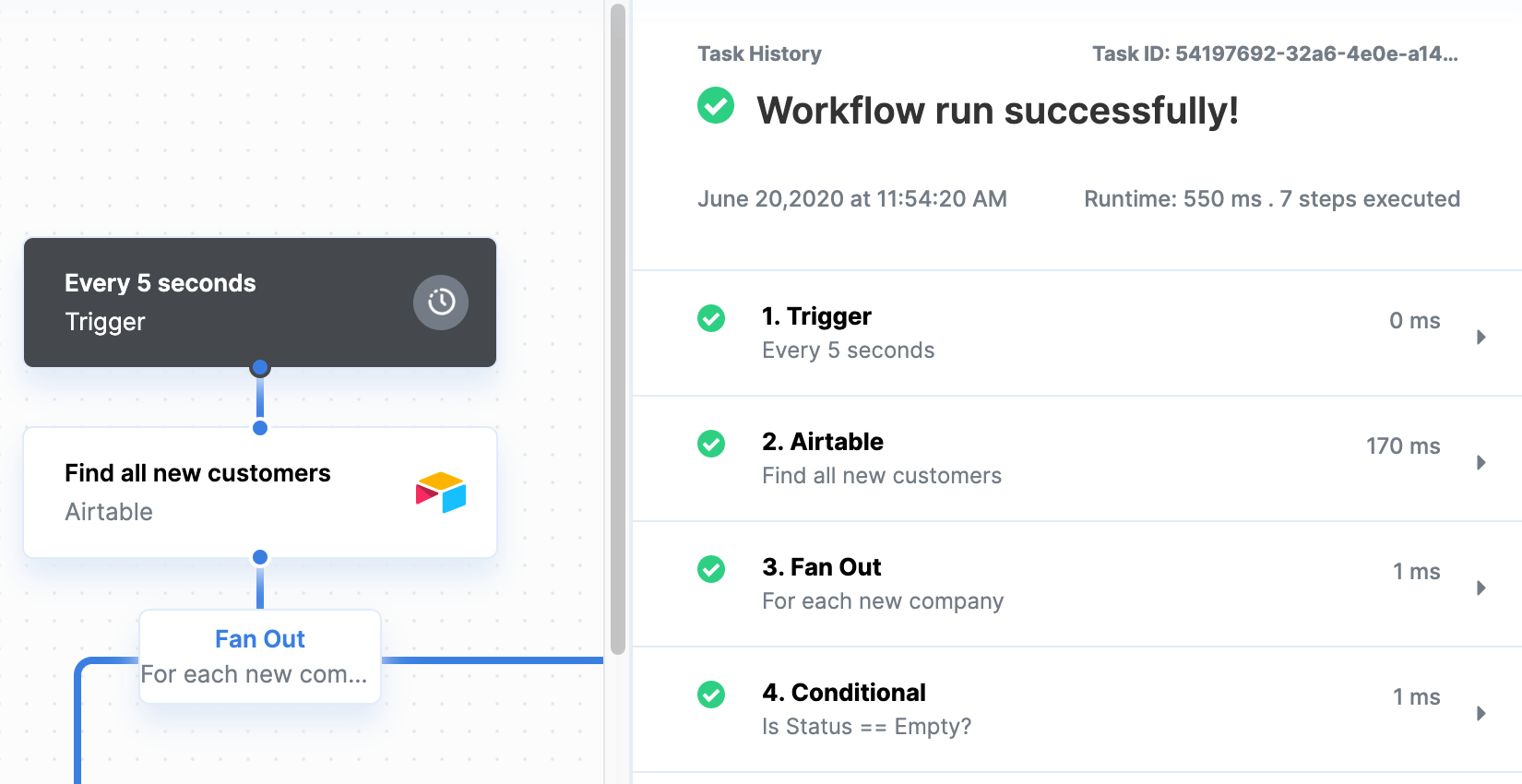
* In [Workflows](/workflows/building-workflows), each successful Action, Request, and Function are counted as tasks. You can see which steps succeeded in
the workflow execution view of [Monitoring > Workflows](/workflows/viewing-workflow-executions) (see screenshot below).
* All [Proxy API](/apis/proxy) requests are counted as tasks.
 ## How workflow steps count towards tasks
The following steps count as tasks:
* [Integrations](/resources/integrations) (e.g. Salesforce, Slack, Google Sheets)
* [Request](/workflows/requests)
* [Function](/workflows/functions)
The following steps **do not** count as tasks:
* [Triggers](/workflows/triggers)
* [Conditional](/workflows/using-conditionals)
* [Fan Out](/workflows/using-fan-out)
* Response
* [Delay](/workflows/using-delay)
**Note:** While the Fan Out itself doesn't count as a task, the contents within Fan Outs count as tasks per iteration.
## Task limits
The task limit is the maximum number of tasks you can run before your workflows stop executing during the current billing cycle.
## How task usage resets
Task usage resets at the beginning of your billing period each month. Unused tasks will not roll over to the next billing period.
### What happens if I reach my task limit?
If you are on a legacy plan that bills by task usage, you'll receive notification emails from Paragon as you get closer to your task limit.
We'll send an email notifying you that your workflows have stopped executing. Users on any of our [paid plans](https://www.useparagon.com/pricing) have a five-day grace period to upgrade before workflows stop executing.
Any unfinished tasks will show up on the [Monitoring](/workflows/viewing-workflow-executions) page as a failed workflow. You can [replay stopped workflows](/workflows/viewing-workflow-executions#editing-and-replaying) when your billing cycle restarts or you upgrade your plan.
Need more tasks? Upgrade to a [paid plan](https://useparagon.com/pricing) today!
## How workflow steps count towards tasks
The following steps count as tasks:
* [Integrations](/resources/integrations) (e.g. Salesforce, Slack, Google Sheets)
* [Request](/workflows/requests)
* [Function](/workflows/functions)
The following steps **do not** count as tasks:
* [Triggers](/workflows/triggers)
* [Conditional](/workflows/using-conditionals)
* [Fan Out](/workflows/using-fan-out)
* Response
* [Delay](/workflows/using-delay)
**Note:** While the Fan Out itself doesn't count as a task, the contents within Fan Outs count as tasks per iteration.
## Task limits
The task limit is the maximum number of tasks you can run before your workflows stop executing during the current billing cycle.
## How task usage resets
Task usage resets at the beginning of your billing period each month. Unused tasks will not roll over to the next billing period.
### What happens if I reach my task limit?
If you are on a legacy plan that bills by task usage, you'll receive notification emails from Paragon as you get closer to your task limit.
We'll send an email notifying you that your workflows have stopped executing. Users on any of our [paid plans](https://www.useparagon.com/pricing) have a five-day grace period to upgrade before workflows stop executing.
Any unfinished tasks will show up on the [Monitoring](/workflows/viewing-workflow-executions) page as a failed workflow. You can [replay stopped workflows](/workflows/viewing-workflow-executions#editing-and-replaying) when your billing cycle restarts or you upgrade your plan.
Need more tasks? Upgrade to a [paid plan](https://useparagon.com/pricing) today!