> ## Documentation Index
> Fetch the complete documentation index at: https://docs.useparagon.com/llms.txt
> Use this file to discover all available pages before exploring further.
# Custom Provider
> Connect to any OAuth app in Paragon
## Overview
Paragon's OAuth interface allows you to connect any OAuth provider in around 5 minutes.
## Setup Guide
### 1. Gather your credentials
You can usually find the OAuth credentials for your selected provider in their API Documentation. You'll need access to the following credentials:
* Name
* Auth URL
* Access Token URL
* Client ID
* Client Secret
* Scopes Requested
### 2. Connect your other OAuth provider
1. Click the "**Trigger**" step in the workflow canvas, and choose **OAuth** from the sidebar.
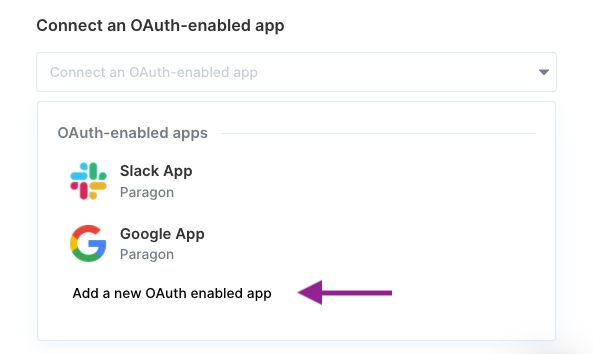
2. Under **Connect an OAuth-enabled app**, choose "**Add a new OAuth-enabled app**" and select "**Other OAuth provider**".
 ### 3. Input your credentials
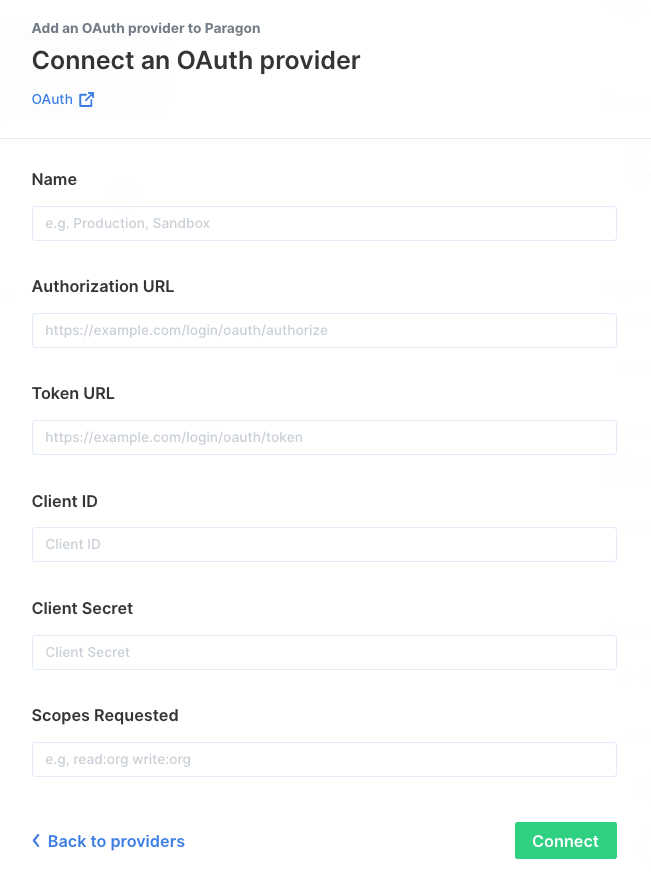
Fill out your credentials from [Step 1](/automate/resources/oauth/custom#1-gather-your-credentials) in their respective sections:
* **Name:** Chosen name for your provider.
* **Authorization URL**
* **Token URL**
* **Client ID:** Public identifier for apps
* **Client Secret:** Secret known only between your application and provider.
* **Scopes Requested:** A space-separated list of OAuth scopes. A complete list of acceptable scopes can be found on your provider's OAuth documentation.
### 3. Input your credentials
Fill out your credentials from [Step 1](/automate/resources/oauth/custom#1-gather-your-credentials) in their respective sections:
* **Name:** Chosen name for your provider.
* **Authorization URL**
* **Token URL**
* **Client ID:** Public identifier for apps
* **Client Secret:** Secret known only between your application and provider.
* **Scopes Requested:** A space-separated list of OAuth scopes. A complete list of acceptable scopes can be found on your provider's OAuth documentation.
 ### 4. Add the Redirect URL to provider
Paragon provides a redirect URL to send information to your OAuth provider. Refer to your application provider's OAuth documentation for more information on where to input your redirect URL.
## OAuth-enabled Actions
Ready to use your OAuth-enabled app in your workflow? Check out our OAuth-enabled action documentation [here](/automate/building-workflows/configuring-oauth#oauth-enabled-actions) to get started!
### 4. Add the Redirect URL to provider
Paragon provides a redirect URL to send information to your OAuth provider. Refer to your application provider's OAuth documentation for more information on where to input your redirect URL.
## OAuth-enabled Actions
Ready to use your OAuth-enabled app in your workflow? Check out our OAuth-enabled action documentation [here](/automate/building-workflows/configuring-oauth#oauth-enabled-actions) to get started!