> ## Documentation Index
> Fetch the complete documentation index at: https://docs.useparagon.com/llms.txt
> Use this file to discover all available pages before exploring further.

# JWT Permissions

> Use JWT Permissions to control the credentials and configurations that an authenticated user has access to using the Paragon User Token.

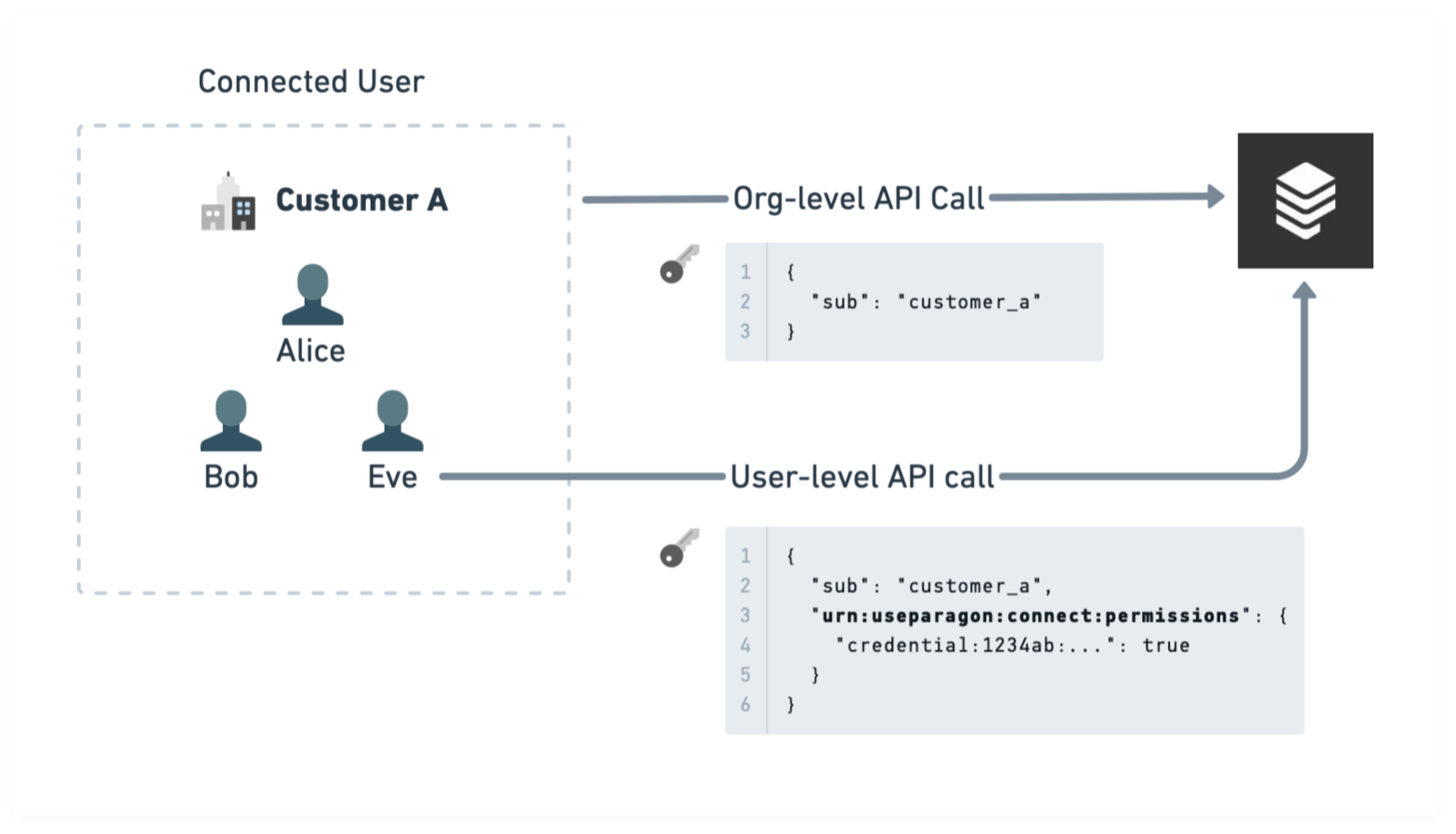
If your Connected Users represent accounts, organizations, or some other *group* of users in your platform, then you may want to control the permissions of the credentials and configurations within that user to only the set that an authenticated user of your application should have access to.

By default, a Paragon User Token grants access to all credentials and configurations within a Connected User (identified by the `sub` field in the JWT).

<Frame>
  <img src="https://mintcdn.com/paragon/FRPfCwjBzebqFHrx/assets/jwt-permissions.png?fit=max&auto=format&n=FRPfCwjBzebqFHrx&q=85&s=01904bc9a5e37be6f48650c87558d6b7" alt="Diagram illustrating org- vs. user-level tokens" width="1567" height="898" data-path="assets/jwt-permissions.png" />
</Frame>

You can restrict access to specific credentials and configurations by adding an additional claim on the [Paragon User Token](../../getting-started/installing-the-connect-sdk.md#setup) (JWT) that is passed for an authenticated user in your platform.

You can also use JWT Permissions to prevent certain types of API calls from being made using a given token, for example: Proxy API calls, App Events, or Workflow triggers.

## Usage

The claim for JWT Permissions is called `urn:useparagon:connect:permissions` and is structured as an object with keys of [Scopes](#jwt-scopes) (i.e. what to scope a group of permissions/rules to) and values of [Permissions](#jwt-permissions) (i.e. visibility of specific credentials or configurations and the types of operations that are allowed).

Here are some examples of token types that are expressible with JWT Permissions:

<CodeGroup>
  ```json Admin (org-level) theme={null}
  {
    "sub": "<Paragon User ID>",
    "urn:useparagon:connect:permissions": {
      "integration:*": true
    }
  }
  ```

  ```json Restricted to specific accounts (user-level) theme={null}
  {
    "sub": "<Paragon User ID>",
    "urn:useparagon:connect:permissions": {
      "integration:gmail": {
        "credential:abf961e3-12ec-40fe-8aa9-caa5ab162a6a": true
      }
    }
  }
  ```

  ```json Restricted to specific configurations theme={null}
  {
    "sub": "<Paragon User ID>",
    "urn:useparagon:connect:permissions": {
      "integration:*": true,
      "integration:slack": {
        // Applies to all teams
        "credential:*": {
          "permissions": [
            "events"
          ],
          // Applies to all Slack configurations with external ID of
          // "Team A", for all Slack accounts
          "configuration:ext:Team A": [
            "config:write",
            "settings:write"
          ]
        }
      },
      "integration:custom.test": false,
      "integration:hubspot": {
        "credential:*": [
          "config:write"
        ]
      }
    }
  }
  ```
</CodeGroup>

<Info>
  **Claims passed in the JWT are not persisted or saved in any way.** They are only used and evaluated for the current API request and should be included with every token that requires permissions control.
</Info>

## JWT Scopes

The following scopes can be used to assign permissions and rules. These scopes are ordered from least specific to most specific.

Permissions designated at more specific scopes will override those inherited from less specific scopes.

<table data-full-width="false">
  <thead>
    <tr>
      <th width="245">Scope</th>
      <th>Description</th>
    </tr>
  </thead>

  <tbody>
    <tr>
      <td>
        **integration:\***
      </td>

      <td>All integrations</td>
    </tr>

    <tr>
      <td>
        **integration:\[name]**
      </td>

      <td>
        An integration matching a name of \[name] (as passed to{" "}
        <code>paragon.connect</code> )
      </td>
    </tr>

    <tr>
      <td>
        **credential:\***
      </td>

      <td>All credentials belonging to an integration</td>
    </tr>

    <tr>
      <td>
        **credential:\[uuid]**
      </td>

      <td>All credentials matching an ID of \[uuid]</td>
    </tr>

    <tr>
      <td>
        **configuration:\***
      </td>

      <td>All configurations belonging to a credential</td>
    </tr>

    <tr>
      <td>
        **configuration:ext:\[id]**
      </td>

      <td>All configurations matching an External ID of \[id]</td>
    </tr>
  </tbody>
</table>

## JWT Permissions

The following permissions can be used to configure API capabilities for a Paragon User Token. These permissions can apply to any of the scopes listed above.

Permissions must be specified as an array, or as a Boolean interpreted as `true` = Allow All, `false` = Deny All.

<table>
  <thead>
    <tr>
      <th width="221">Permission</th>
      <th>Description</th>
    </tr>
  </thead>

  <tbody>
    <tr>
      <td>
        **credential:write**
      </td>

      <td>
        Connect a new credential, reconnect an existing credential, or
        disconnect an existing credential
      </td>
    </tr>

    <tr>
      <td>
        **config:write**
      </td>

      <td>Create, modify, or destroy a configuration</td>
    </tr>

    <tr>
      <td>
        **settings:read**
      </td>

      <td>Read User Settings and Workflow Enablement</td>
    </tr>

    <tr>
      <td>
        **settings:write**
      </td>

      <td>Write and read User Settings and Workflow Enablements</td>
    </tr>

    <tr>
      <td>
        **metadata:read**
      </td>

      <td>Read User Metadata</td>
    </tr>

    <tr>
      <td>
        **metadata:write**
      </td>

      <td>Write and read User Metadata</td>
    </tr>

    <tr>
      <td>
        **proxy-api**
      </td>

      <td>Send requests to the Proxy API</td>
    </tr>

    <tr>
      <td>
        **events**
      </td>

      <td>Send App Events</td>
    </tr>

    <tr>
      <td>
        **workflows**
      </td>

      <td>Send Workflow Request triggers</td>
    </tr>
  </tbody>
</table>
