> ## Documentation Index
> Fetch the complete documentation index at: https://docs.useparagon.com/llms.txt
> Use this file to discover all available pages before exploring further.
# Receiving Webhooks
> Learn how to receive, validate, and process webhook events for your users' trigger subscriptions.
## Webhook URLs
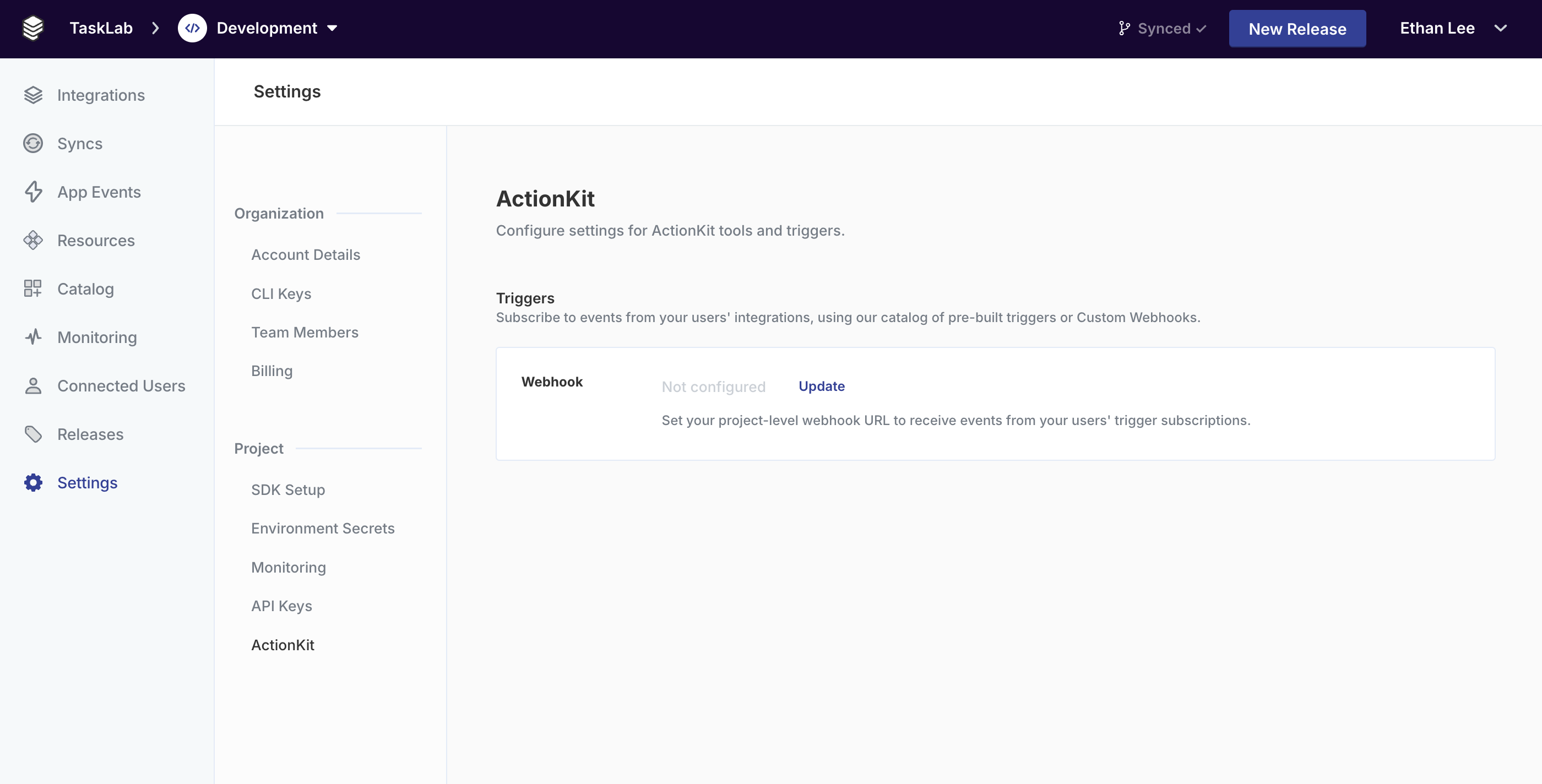
By default, trigger subscriptions will send events to the URL that you have configured via the dashboard for the associated project.
You can set or change your project's Webhook URL by going to the **Settings** > **ActionKit** page of your dashboard:
 You can also override the URL for a specific trigger subscription by passing a `webhookOverride` property to the API when you subscribe:
```http highlight={10-14} theme={null}
POST /projects/{project_id}/trigger-subscriptions
Authorization: Bearer [Paragon User Token]
{
"type": "SALESFORCE_TRIGGER_RECORD_CREATED",
"parameters": {
"recordType": "Opportunity"
},
"webhookOverride": {
"url": "https://example.com",
"headers": {},
"metadata": {},
}
}
```
## Signing secret
Your signing secret is automatically generated when you first save your webhook configuration. You can find it in the **ActionKit** section of your project settings under **Signing Secret**.
To view your signing secret:
1. Navigate to **Settings** > **ActionKit** in your Paragon dashboard.
2. Click **Reveal** next to the **Signing Secret** row.
3. Copy the secret for use in your webhook verification logic.
Keep your signing secret private. Do not expose it in client-side code or public repositories.
## Webhook Payloads
Every webhook payload has a few standard properties, including a HMAC-SHA256 signature that can be used to validate the trigger payload.
The trigger event data will be available in the `payload` key.
```http Example theme={null}
x-paragon-signature: v1=[signature]
{
"eventId": "[uuid]",
"userId": "12345",
"integration": "salesforce",
"triggerType": "SALESFORCE_TRIGGER_RECORD_CREATED",
"triggerSubscriptionId": "[uuid]",
"credentialId": "[uuid]",
"projectId": "[uuid]",
"dateReceived": "2025-10-14T00:00:00Z",
"payload": {...},
"triggerSubscriptionMetadata": {...}
}
```
**Headers:**
HMAC-SHA256 signature of the webhook JSON body, preceded by the versioning prefix `v1=`. Use this to validate the authenticity of this event as delivered by Paragon, with the project-specific webhook secret found in your project settings.
**Body:**
A unique ID for this event. Use this ID for event deduplication in case Paragon sends multiple requests to your webhook for the same event.
The ID for the Connected User that this trigger fired for. This is the same ID that is passed to the `sub` claim of the Paragon User Token (JWT).
The name of the integration that this trigger fired for.
**Example:** `salesforce`
The `type` of trigger that fired.
**Example:** `SALESFORCE_TRIGGER_RECORD_CREATED`
The event payload as received from the trigger. The schema of this object will vary depending on the trigger type. You can get example objects to use as the schema for this trigger with [Get Example Payloads](/actionkit/triggers/api-reference/get-example-payload).
The UUID of the trigger subscription that fired.
The UUID of the user's credential that triggered this event.
The UUID of the Paragon project.
An ISO datetime string of the original date that this event was received. You can use this to sequence events if necessary.
If this trigger subscription was created with `metadata` passed in `webhookOverride`, then the metadata will be passed in this field of the incoming webhook body.
## Verifying webhook signatures
Use the `x-paragon-signature` header to confirm that the payload was sent by Paragon and has not been tampered with.
### Verification steps
Read the `x-paragon-signature` header from the incoming request and remove the `v1=` prefix.
Create an HMAC-SHA256 hash of the raw JSON request body using your signing secret, then hex-encode the result.
Use a timing-safe comparison to check whether the computed signature matches the signature from the header.
### Example: Node.js
```javascript theme={null}
const crypto = require('crypto');
function verifyWebhookSignature(rawBody, signatureHeader, signingSecret) {
const signature = signatureHeader.replace(/^v1=/, '');
const expectedSignature = crypto
.createHmac('sha256', signingSecret)
.update(rawBody)
.digest('hex');
return crypto.timingSafeEqual(
Buffer.from(signature, 'hex'),
Buffer.from(expectedSignature, 'hex'),
);
}
```
### Example: Python
```python theme={null}
import hmac
import hashlib
def verify_webhook_signature(payload: bytes, signature_header: str, signing_secret: str) -> bool:
signature = signature_header.removeprefix('v1=')
expected = hmac.new(
signing_secret.encode('utf-8'),
payload,
hashlib.sha256,
).hexdigest()
return hmac.compare_digest(expected, signature)
```
You can also override the URL for a specific trigger subscription by passing a `webhookOverride` property to the API when you subscribe:
```http highlight={10-14} theme={null}
POST /projects/{project_id}/trigger-subscriptions
Authorization: Bearer [Paragon User Token]
{
"type": "SALESFORCE_TRIGGER_RECORD_CREATED",
"parameters": {
"recordType": "Opportunity"
},
"webhookOverride": {
"url": "https://example.com",
"headers": {},
"metadata": {},
}
}
```
## Signing secret
Your signing secret is automatically generated when you first save your webhook configuration. You can find it in the **ActionKit** section of your project settings under **Signing Secret**.
To view your signing secret:
1. Navigate to **Settings** > **ActionKit** in your Paragon dashboard.
2. Click **Reveal** next to the **Signing Secret** row.
3. Copy the secret for use in your webhook verification logic.
Keep your signing secret private. Do not expose it in client-side code or public repositories.
## Webhook Payloads
Every webhook payload has a few standard properties, including a HMAC-SHA256 signature that can be used to validate the trigger payload.
The trigger event data will be available in the `payload` key.
```http Example theme={null}
x-paragon-signature: v1=[signature]
{
"eventId": "[uuid]",
"userId": "12345",
"integration": "salesforce",
"triggerType": "SALESFORCE_TRIGGER_RECORD_CREATED",
"triggerSubscriptionId": "[uuid]",
"credentialId": "[uuid]",
"projectId": "[uuid]",
"dateReceived": "2025-10-14T00:00:00Z",
"payload": {...},
"triggerSubscriptionMetadata": {...}
}
```
**Headers:**
HMAC-SHA256 signature of the webhook JSON body, preceded by the versioning prefix `v1=`. Use this to validate the authenticity of this event as delivered by Paragon, with the project-specific webhook secret found in your project settings.
**Body:**
A unique ID for this event. Use this ID for event deduplication in case Paragon sends multiple requests to your webhook for the same event.
The ID for the Connected User that this trigger fired for. This is the same ID that is passed to the `sub` claim of the Paragon User Token (JWT).
The name of the integration that this trigger fired for.
**Example:** `salesforce`
The `type` of trigger that fired.
**Example:** `SALESFORCE_TRIGGER_RECORD_CREATED`
The event payload as received from the trigger. The schema of this object will vary depending on the trigger type. You can get example objects to use as the schema for this trigger with [Get Example Payloads](/actionkit/triggers/api-reference/get-example-payload).
The UUID of the trigger subscription that fired.
The UUID of the user's credential that triggered this event.
The UUID of the Paragon project.
An ISO datetime string of the original date that this event was received. You can use this to sequence events if necessary.
If this trigger subscription was created with `metadata` passed in `webhookOverride`, then the metadata will be passed in this field of the incoming webhook body.
## Verifying webhook signatures
Use the `x-paragon-signature` header to confirm that the payload was sent by Paragon and has not been tampered with.
### Verification steps
Read the `x-paragon-signature` header from the incoming request and remove the `v1=` prefix.
Create an HMAC-SHA256 hash of the raw JSON request body using your signing secret, then hex-encode the result.
Use a timing-safe comparison to check whether the computed signature matches the signature from the header.
### Example: Node.js
```javascript theme={null}
const crypto = require('crypto');
function verifyWebhookSignature(rawBody, signatureHeader, signingSecret) {
const signature = signatureHeader.replace(/^v1=/, '');
const expectedSignature = crypto
.createHmac('sha256', signingSecret)
.update(rawBody)
.digest('hex');
return crypto.timingSafeEqual(
Buffer.from(signature, 'hex'),
Buffer.from(expectedSignature, 'hex'),
);
}
```
### Example: Python
```python theme={null}
import hmac
import hashlib
def verify_webhook_signature(payload: bytes, signature_header: str, signing_secret: str) -> bool:
signature = signature_header.removeprefix('v1=')
expected = hmac.new(
signing_secret.encode('utf-8'),
payload,
hashlib.sha256,
).hexdigest()
return hmac.compare_digest(expected, signature)
```